Modern home office setup with a monitor, ergonomic chair, keyboard, and indoor plants near a window with blinds.

About Website

About Website

ZEP Mob: E-learning mobile application

ZEP Mob: E-learning mobile application

The ZEP mobile app extends Zep Analytics’ learning ecosystem into a focused, on-the-go experience. Designed for seamless course access, it brings prerecorded lessons, bootcamp resources, and progress tracking into a single mobile-first interface. The app also integrates ZEP’s points-based engagement system, rewarding learners for consistent participation and growth.

my role

UX/UI Designer

UX/UI Designer

Client

ZEP Analytics

ZEP Analytics

Duration

12 weeks

12 weeks

Tools

Figma

Adobe Illustrator

contribution

Ideation
Lo-fi & Hi-fi Wireframing
Hi-fi Prototyping
User Interviews

Ideation
Lo-fi & Hi-fi Wireframing
Hi-fi Prototyping
User Interviews

Team

Satyajit Patnaik, PM
Shardul, UX Engineer
Jeyavel, Programmer
Surbit Kumar, Engineer

Satyajit Patnaik, PM
Shardul, UX Engineer
Jeyavel, Programmer
Surbit Kumar, Engineer

Process

Developed our application through following Steps:
Define, Discover, Design, Deliver
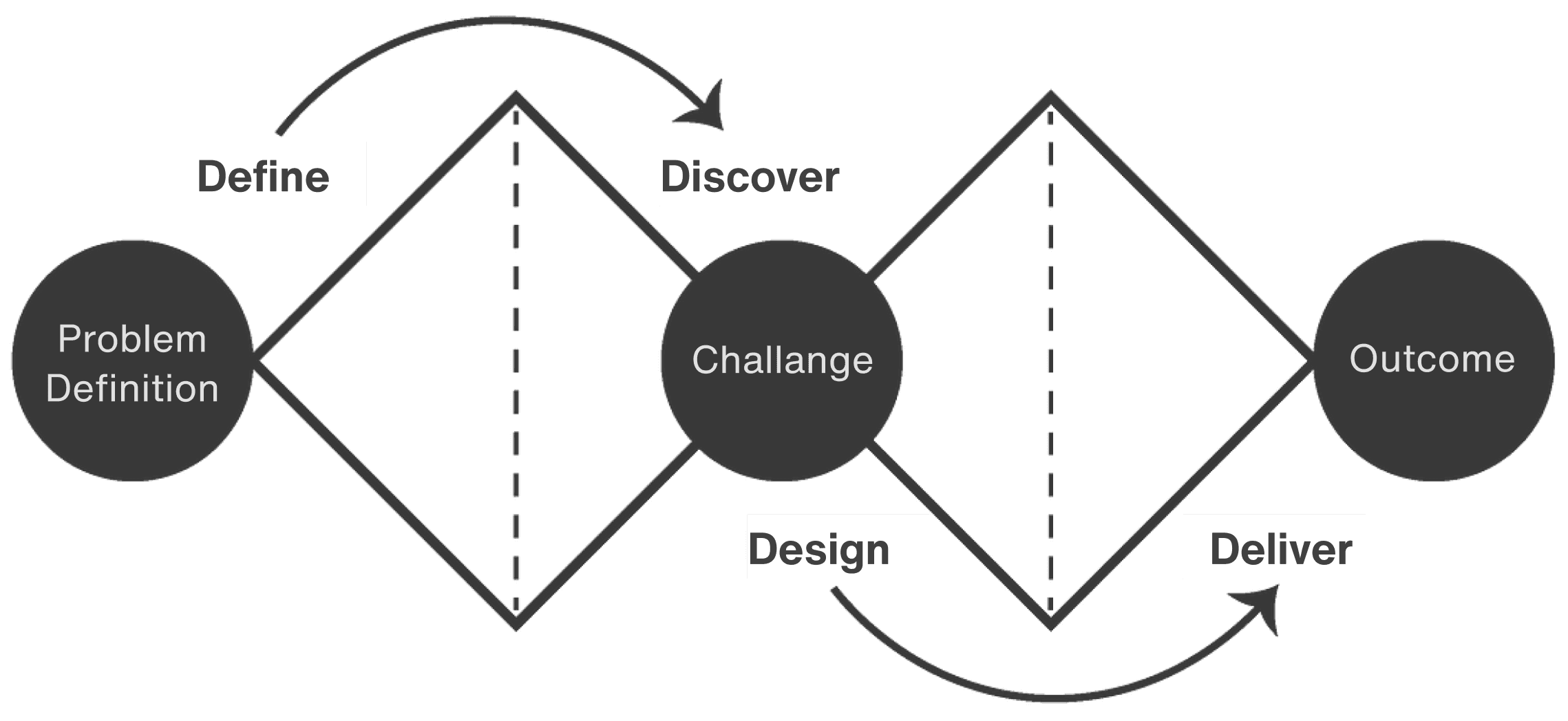
Modern home office setup with a monitor, ergonomic chair, keyboard, and indoor plants near a window with blinds.

01 define

objective

Our central objective is to harness the power of mobile technology to significantly extend ZEP Analytics' reach, making high-quality education readily accessible to a wider audience. This challenge requires us to create a cutting-edge mobile E-learning application that guarantees an effortless and engaging learning experience for users wherever they are.

goals

  1. User Research Goal: Conduct user research to identify pain points and challenges faced by potential app users, ensuring a deep understanding of user needs and issues.

  2. Data Analysis Goal: Analyse the collected user research data to pinpoint specific problems and pain points, providing a foundation for design improvements.

  3. Design Ideation Goal: Ideate and propose design solutions that address the identified user pain points and enhance the overall user experience.

  4. Wireframe and Mockup Goal: Create detailed workflows, wireframes, and mockups that visually communicate the proposed design solutions and their implementation.

  5. Prototype Development Goal: Develop a functional prototype to demonstrate and validate the design improvements with users, allowing for interactive testing and feedback.

  6. Usability Testing Goal: Conduct usability testing with target users to gather feedback, evaluate the design solutions, and make iterative improvements based on user insights.

02 discovery

02 discovery

02 discovery

research

I spent a lot of time looking at what the users want and how they feel. Big problems that keeps coming up, & that users are talking a lot about are :

  1. An intuitive and clutter-free user interface: They want menus, icons, and navigation to be simple and easy to use.

  2. Access to a wide variety of high-quality educational content: This includes text, videos, quizzes, and interactive materials, all of which should be easy to discover and engage with.

  3. Personalised learning experiences: Users want content (here it can be on the basis of courses) recommendations tailored to their needs, customised learning paths, and tools to track their progress.

  4. Detailed progress tracking: Users desire visual indicators like progress bars (in completing courses), badges, and milestones to monitor their accomplishments and stay motivated.

  5. Offline access to content: For learning without an internet connection, which is particularly useful during commutes or in areas with limited connectivity.

  6. Effective feedback and assessment mechanisms: Users value timely feedback on assignments and assessments, along with clear explanations for correct and incorrect answers.

general problems

E-learning mobile applications commonly face a range of general problems and challenges.

Problem 1: Complex Layouts and User Frustration
The complex layouts and confusing designs often lead to frustration and disinterest among learners.

Problem 2: Impersonal Learning Experiences
Users frequently feel disconnected because these apps don't cater to their unique learning needs and aspirations.

Problem 2: Impersonal Learning Experiences
Users frequently feel disconnected, apps don't cater to their unique learning needs & aspirations.

Problem 3: Lack of Progress Monitoring
Mechanisms for users to monitor their progress in many apps. This ultimately reduces motivation.

Problem 3: Lack of their Progress Monitoring
Mechanisms for users to monitor their progress in many apps. This results in the the reduced motivation.

Problem 4: Inadequate User Engagement Strategies
The lack of interactive elements and motivational features often leads to low user engagement levels.

Problem 4: Inadequate User Engagement Strategies
Lack of interactive elements and motivational features leads to low user engagement levels.

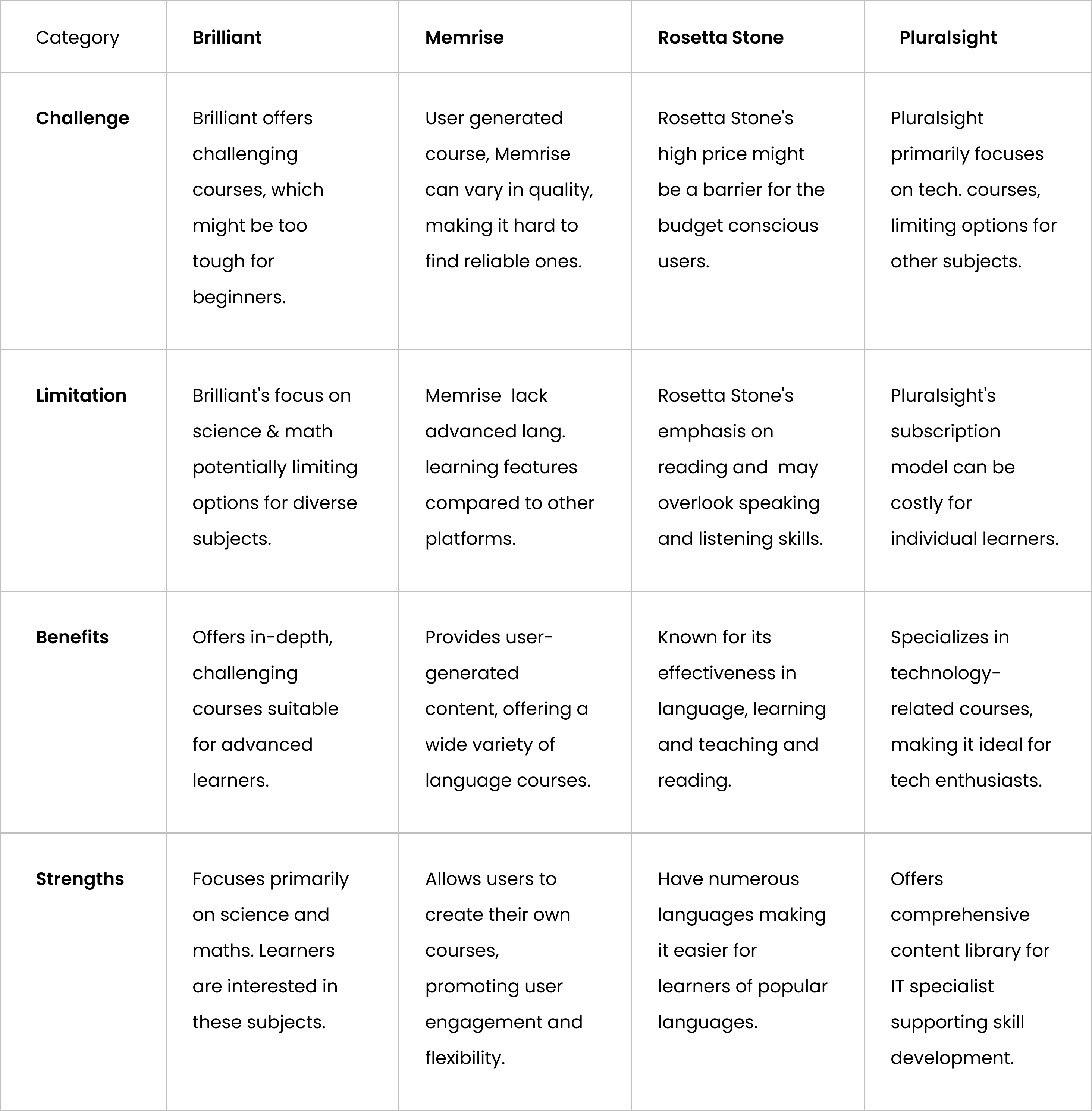
Rerouting the research: Competitive analysis

Below table provides a clear overview of the challenges and limitations of multiple E-learning apps.
These included platforms like Brilliant, Memrise, and Rosetta Stone, Pluralsight
Modern home office setup with a monitor, ergonomic chair, keyboard, and indoor plants near a window with blinds.

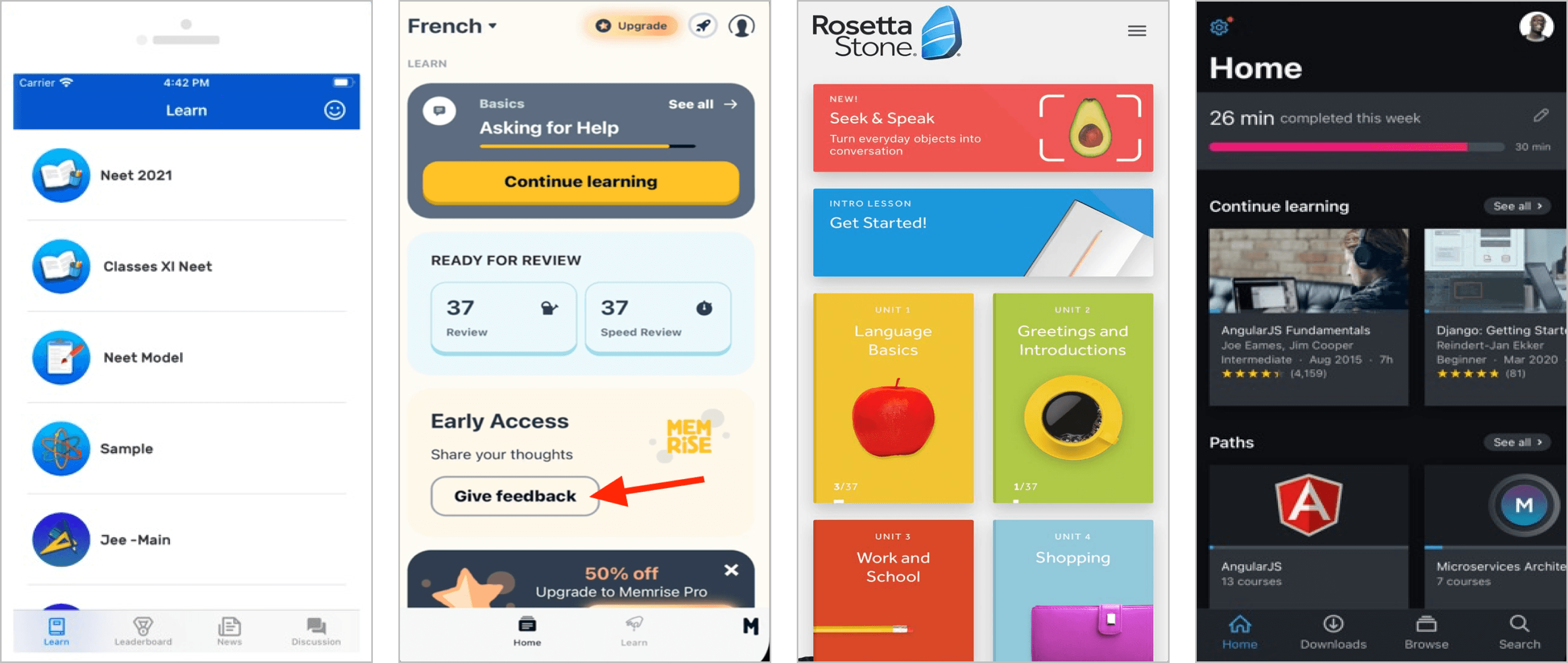
Visual representation of the mobile apps we discussed above.

Visual representation of the mobile apps we discussed above.

Modern home office setup with a monitor, ergonomic chair, keyboard, and indoor plants near a window with blinds.

Key takeaways from Competitive Analysis

Key takeaways from Competitive Analysis

Incorporate user engagement features
Consider forums, or the ability for users to create their own learning materials.

Incorporate user engagement features
Consider forums, or the ability for users to create their own learning.

Offer a variety of content formats
Include in-depth courses, interactive elements, and multimedia content.

Explore adaptive learning techniques
Personalize the learning experience based on user performance and progress.

Explore adaptive learning techniques
Personalize the learning experience based on user performance.

Develop a monetization strategy
Consider a freemium model, tiered subscriptions, or in-app purchases.

Integrate innovative features
Explore speech recognition or other technologies relevant to your learning focus.

03 design

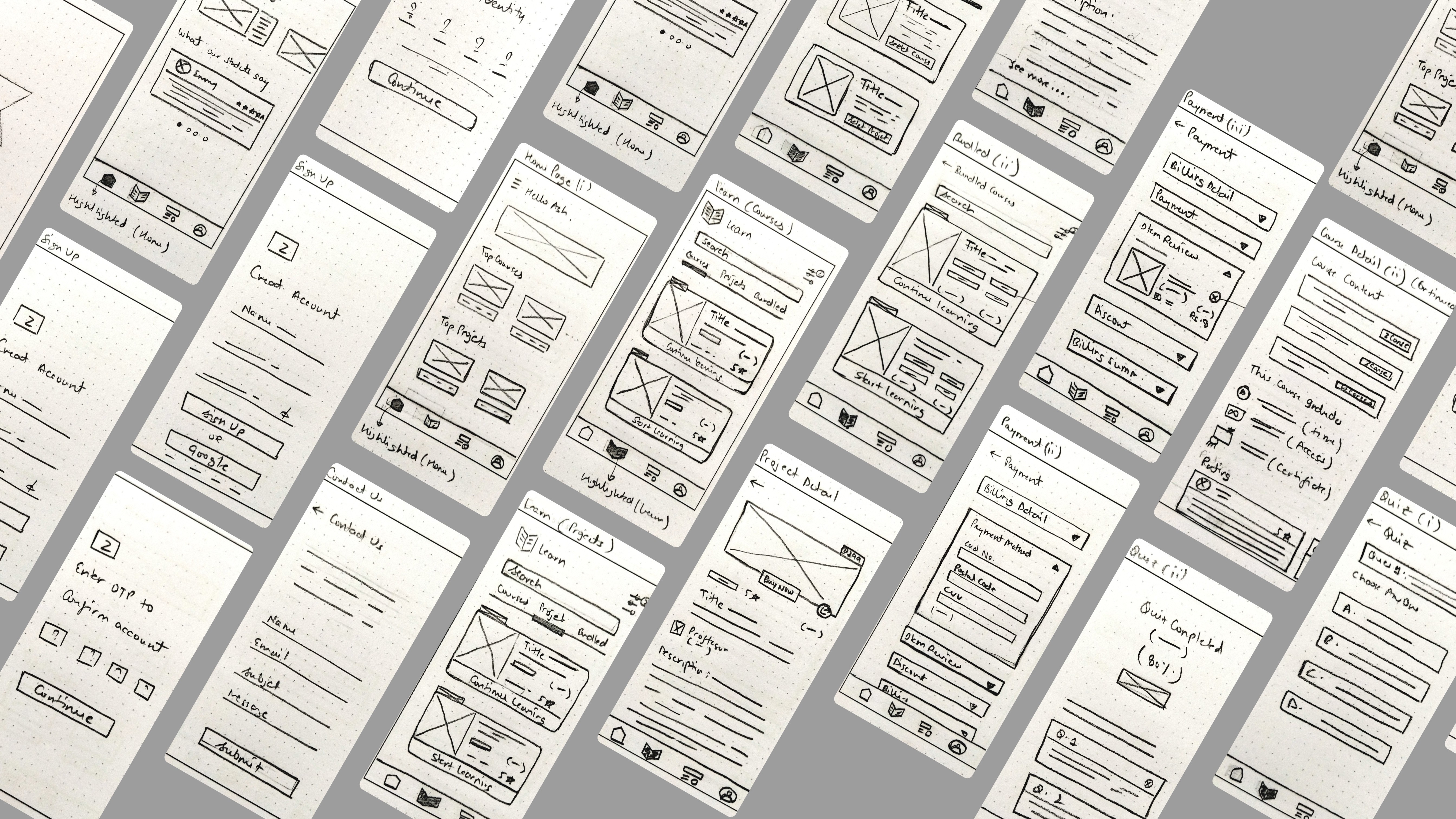
Wireframes

Below are the Low-fidelity wireframes :
Modern home office setup with a monitor, ergonomic chair, keyboard, and indoor plants near a window with blinds.

Hi-fi Mockups

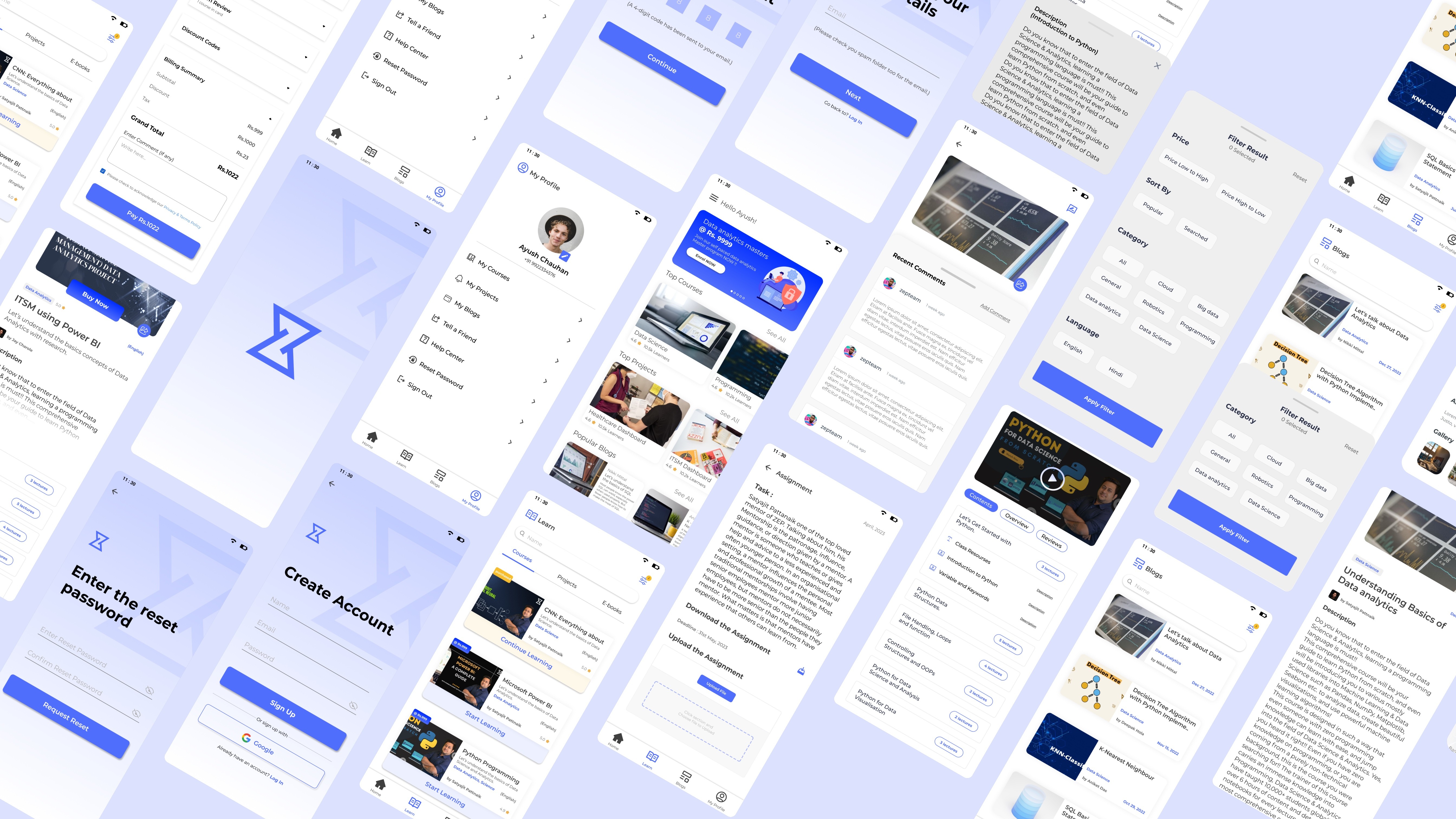
Below is the final design before iteration of ‘Zep Analytics’ mobile application.
Modern home office setup with a monitor, ergonomic chair, keyboard, and indoor plants near a window with blinds.

04 deliver

functionality

To illustrate the functionality of the application for both new and experienced users, we'll examine five significant use cases :
Modern home office setup with a monitor, ergonomic chair, keyboard, and indoor plants near a window with blinds.

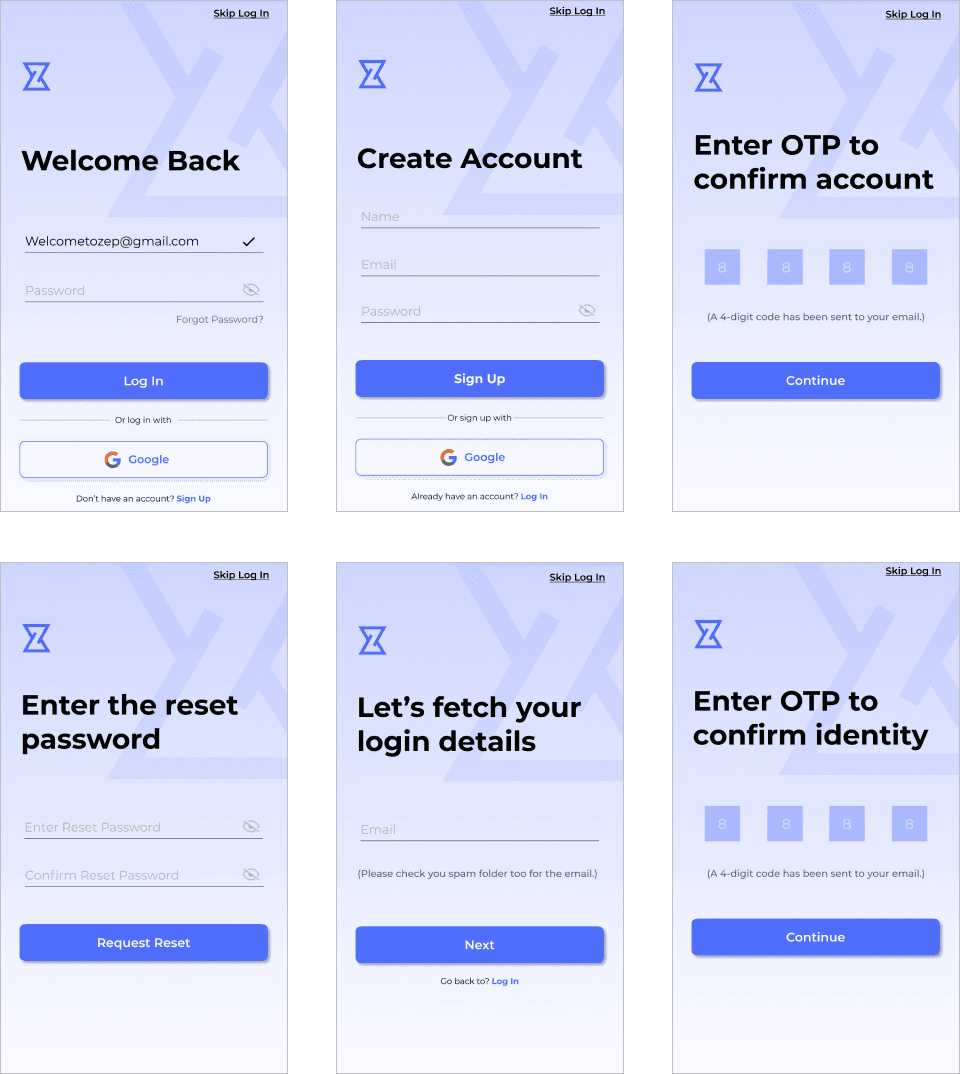
Case I : When user enters the application

  1. Users are presented with clear options: "Sign Up" for newcomers and "Log In" for returning users.

  2. The application offers the convenience of Google Sign-In for a seamless onboarding experience.

  3. A secure and user-friendly OTP (One-Time Password) validation process is in place, instilling a strong sense of trust and security.

  4. For existing users who may forget their password, the "Reset Password" feature guides them through the process, ensuring their accounts remain accessible and protected.

  5. The design of the entire user journey emphasises safety and trust, creating an environment where users feel confident exploring and investing in valuable courses.

Modern home office setup with a monitor, ergonomic chair, keyboard, and indoor plants near a window with blinds.

Case I : When user enters the application

  1. Users are presented with clear options: "Sign Up" for newcomers and "Log In" for returning users.

  2. The application offers the convenience of Google Sign-In for a seamless onboarding experience.

  3. A secure and user-friendly OTP (One-Time Password) validation process is in place, instilling a strong sense of trust and security.

  4. For existing users who may forget their password, the "Reset Password" feature guides them through the process, ensuring their accounts remain accessible and protected.

  5. The design of the entire user journey emphasises safety and trust, creating an environment where users feel confident exploring and investing in valuable courses.

Modern home office setup with a monitor, ergonomic chair, keyboard, and indoor plants near a window with blinds.

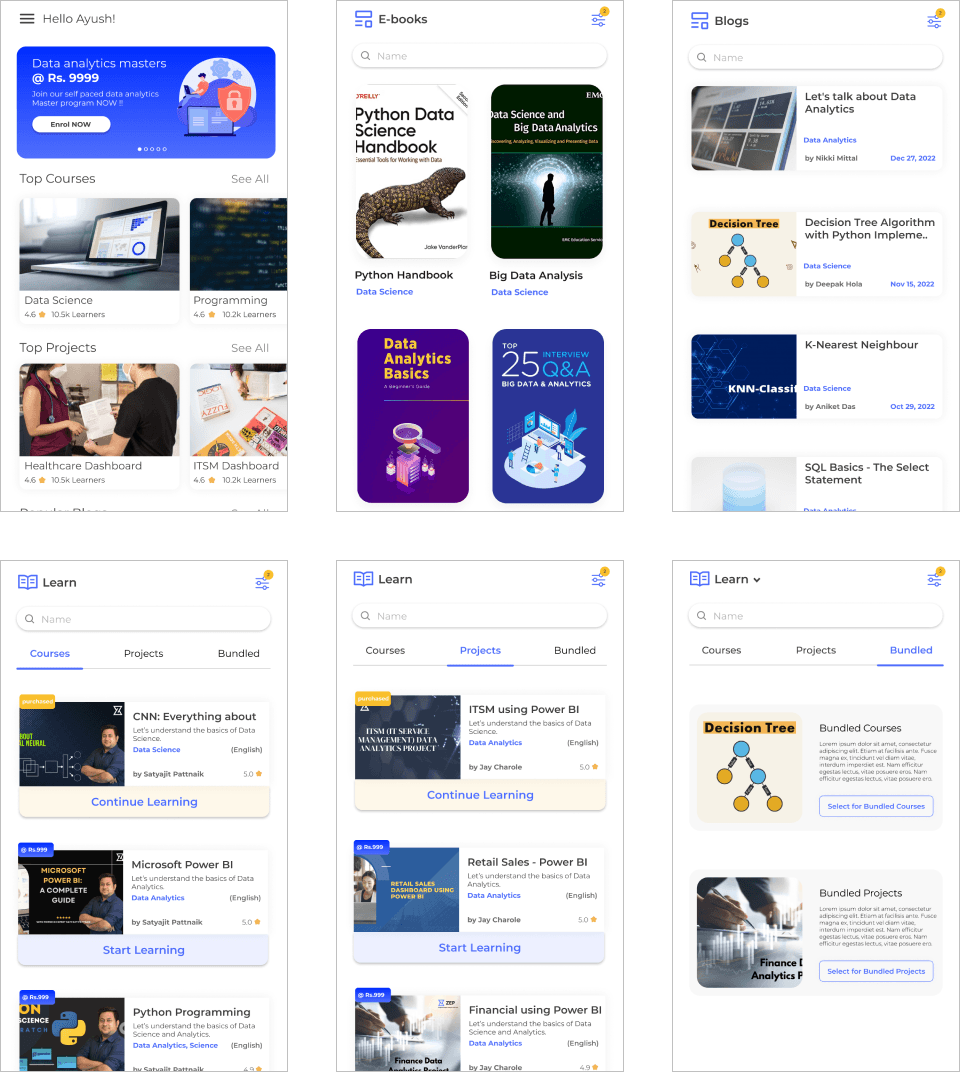
Case II : Walking through application and searching for courses

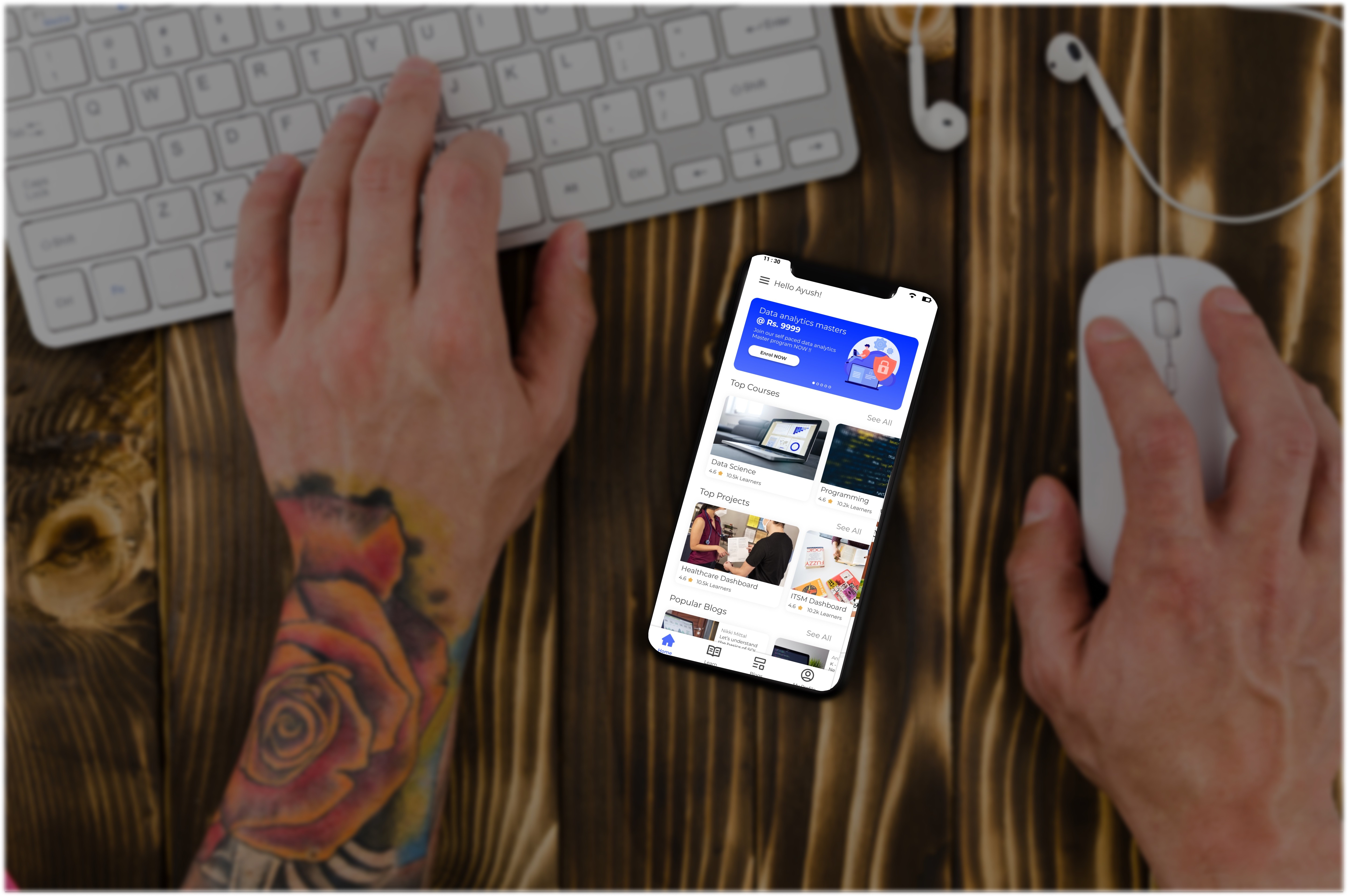
  1. The homepage welcomes users with an attractive banner, highlighting exclusive offers.

  2. Top-selling courses and projects, accompanied by authentic user reviews, guide confident course selection.

  3. In the course/project section, the interface is designed for user convenience: "Start Learning" for new users and "Continue Learning" for those with previous enrolments.

  4. Each course card provides a one-stop view of pricing, ratings, mentor details, and a compelling course summary, empowering users to make informed and swift decisions.

Modern home office setup with a monitor, ergonomic chair, keyboard, and indoor plants near a window with blinds.

Case II : Walking through application and searching for courses

  1. The homepage welcomes users with an attractive banner, highlighting exclusive offers.

  2. Top-selling courses and projects, accompanied by authentic user reviews, guide confident course selection.

  3. In the course/project section, the interface is designed for user convenience: "Start Learning" for new users and "Continue Learning" for those with previous enrolments.

  4. Each course card provides a one-stop view of pricing, ratings, mentor details, and a compelling course summary, empowering users to make informed and swift decisions.

Modern home office setup with a monitor, ergonomic chair, keyboard, and indoor plants near a window with blinds.

Case III : Details of any selected page like : course, blog etc

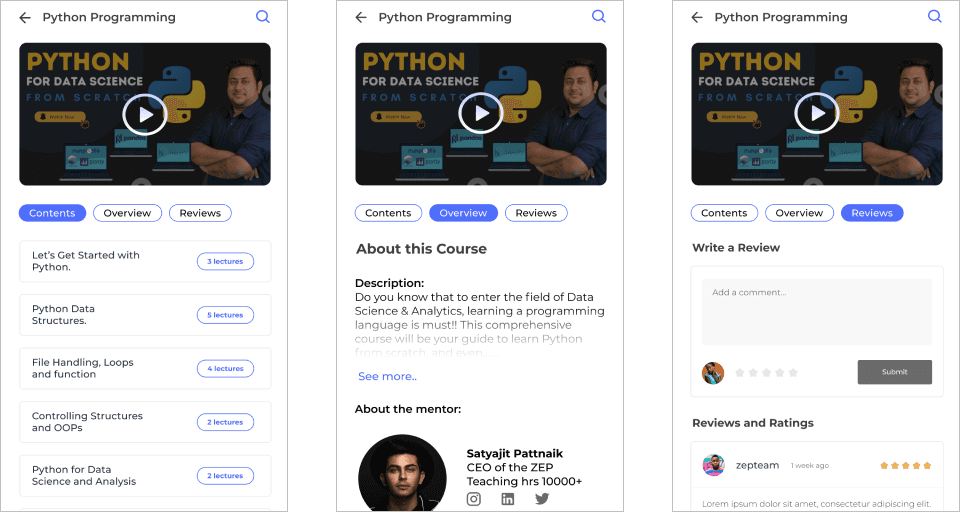
  1. When you pick a course or project, you're taken to a detailed page with three clear sections: "Course/Project," "Overview," and "Review." These sections are neatly laid out to make it easy to find what you're looking for and reduce the need for endless scrolling.

  2. Inside each section, you'll find smaller, organised parts that help you explore and understand the course, project, or content effortlessly. It's designed for a smooth and enjoyable experience.

Modern home office setup with a monitor, ergonomic chair, keyboard, and indoor plants near a window with blinds.

Case III : Details of any selected page like : course, blog etc

  1. When you pick a course or project, you're taken to a detailed page with three clear sections: "Course/Project," "Overview," and "Review." These sections are neatly laid out to make it easy to find what you're looking for and reduce the need for endless scrolling.

  2. Inside each section, you'll find smaller, organised parts that help you explore and understand the course, project, or content effortlessly. It's designed for a smooth and enjoyable experience.

Modern home office setup with a monitor, ergonomic chair, keyboard, and indoor plants near a window with blinds.

Case IV : Choosing the course and buying it

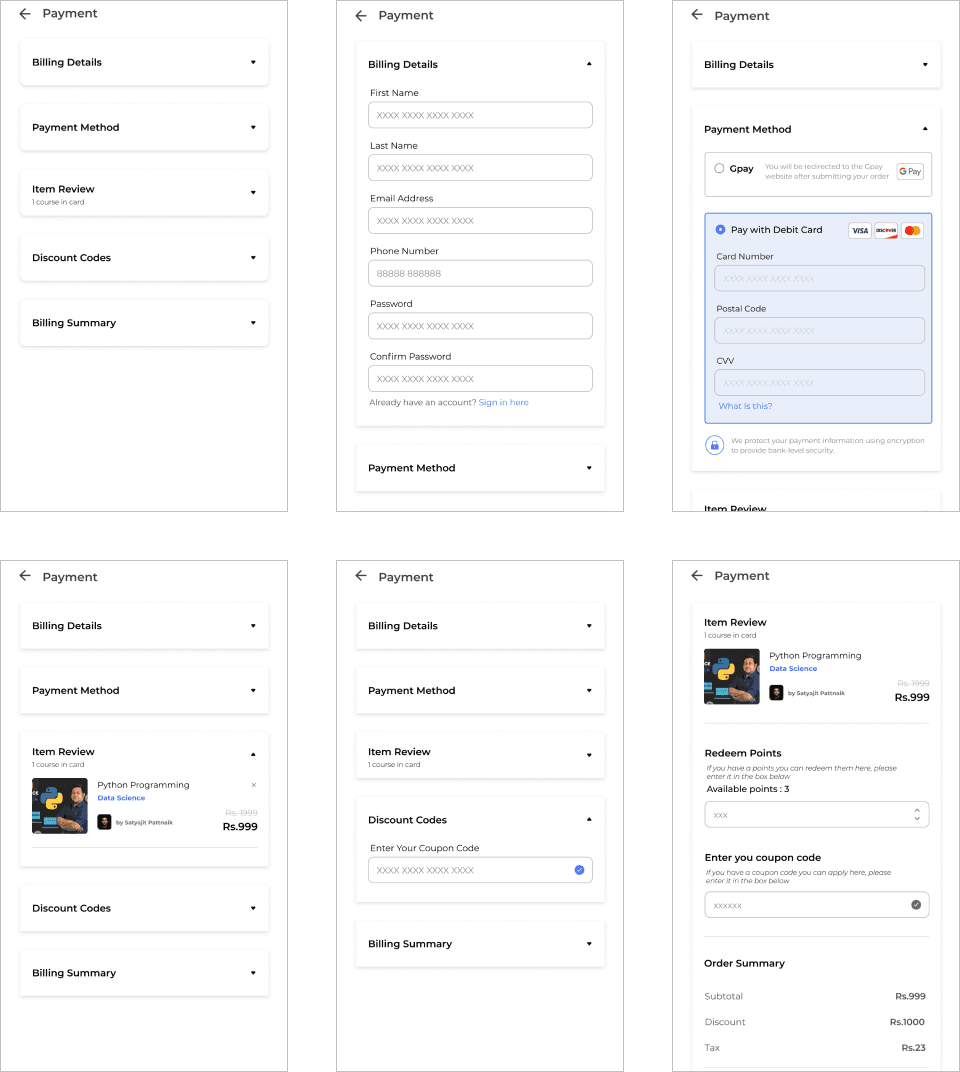
  1. The payment process unfolds in five sections, starting with "Billing Details," where users provide essential information with the freedom to skip non-essential fields.

  2. Two convenient payment gateways, UPI and credit/debit cards, are offered for a smooth purchase experience.

  3. A quick summary of the selected course confirms the user's choice and boosts their confidence.

  4. Users can take advantage of the "Discount Codes" section, where they can apply redeemed points or special codes to unlock discounts, adding a compelling incentive to proceed with the purchase.

  5. The payment process culminates with a thorough review of the entered details, providing users with an opportunity for a final check. The entire design is crafted to ensure simplicity and security, creating a reassuring payment experience.

Modern home office setup with a monitor, ergonomic chair, keyboard, and indoor plants near a window with blinds.

Case IV : Choosing the course and buying it

  1. The payment process unfolds in five sections, starting with "Billing Details," where users provide essential information with the freedom to skip non-essential fields.

  2. Two convenient payment gateways, UPI and credit/debit cards, are offered for a smooth purchase experience.

  3. A quick summary of the selected course confirms the user's choice and boosts their confidence.

  4. Users can take advantage of the "Discount Codes" section, where they can apply redeemed points or special codes to unlock discounts, adding a compelling incentive to proceed with the purchase.

  5. The payment process culminates with a thorough review of the entered details, providing users with an opportunity for a final check. The entire design is crafted to ensure simplicity and security, creating a reassuring payment experience.

Modern home office setup with a monitor, ergonomic chair, keyboard, and indoor plants near a window with blinds.

Case V : Going beyond in the course and seeing throughout the application

  1. Users can explore their purchased courses in-depth or navigate the entire application.

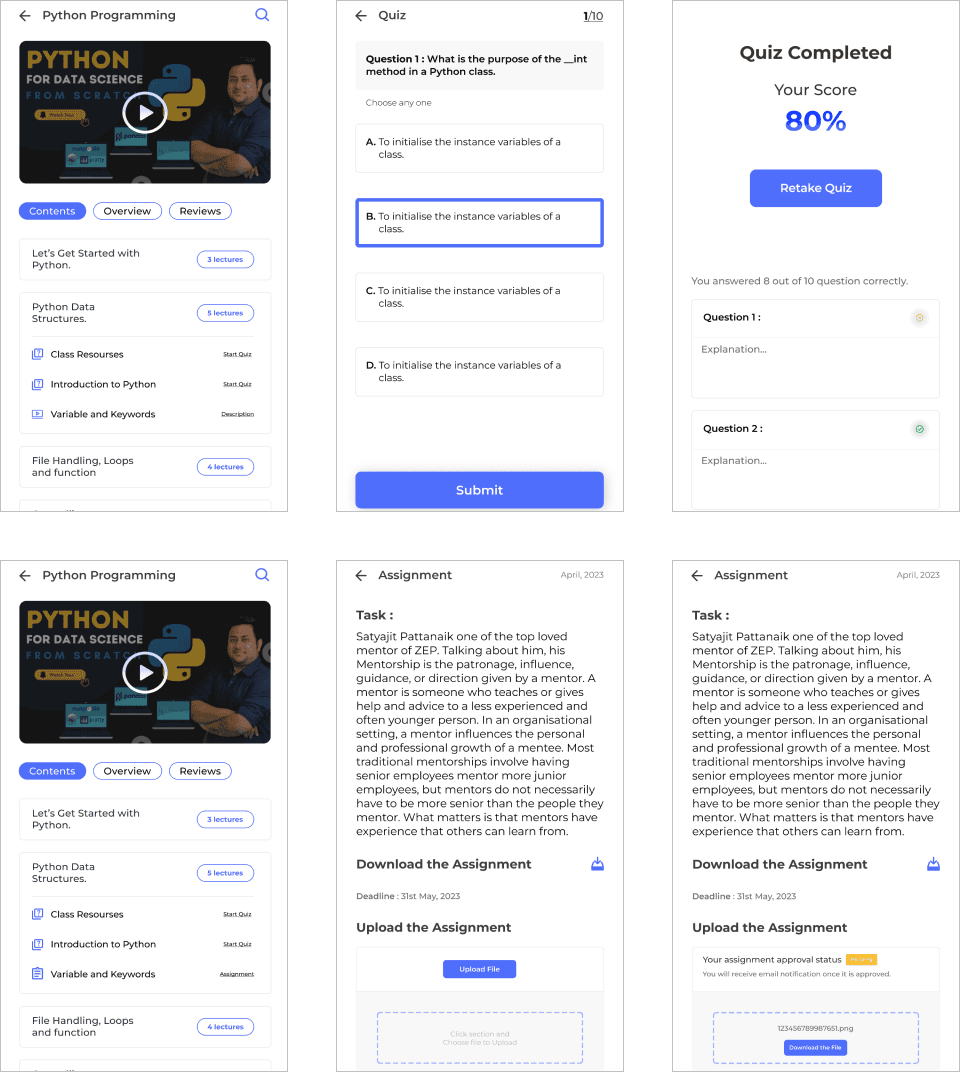
  2. Courses offer various learning options, such as quizzes, assignments, and video responses, tailored to individual preferences.

  3. Upon completing assignments or quizzes, users receive a score and a detailed explanation for incorrect answers, facilitating a rich learning experience.

  4. For those who prefer offline learning, the option to download assignments and tests is available. Users can complete them at their own pace and convenience and later upload their answers when ready. This flexibility promotes an adaptable and user-centric learning approach.

Modern home office setup with a monitor, ergonomic chair, keyboard, and indoor plants near a window with blinds.

Case V : Going beyond in the course and seeing throughout the application

  1. Users can explore their purchased courses in-depth or navigate the entire application.

  2. Courses offer various learning options, such as quizzes, assignments, and video responses, tailored to individual preferences.

  3. Upon completing assignments or quizzes, users receive a score and a detailed explanation for incorrect answers, facilitating a rich learning experience.

  4. For those who prefer offline learning, the option to download assignments and tests is available. Users can complete them at their own pace and convenience and later upload their answers when ready. This flexibility promotes an adaptable and user-centric learning approach.

key reflections

Make a lot of designs options if you are working from far away from the team
There are some stakeholders and colleagues too who absolutely love to say no. In the ideation phase, come up with as many ideas as possible

Focusing on specific needs when a lot of competitor in the market
In a crowded market, I wasn’t trying to make the flashiest app—I wanted to make one people can actually use and trust. Focusing on accessibility, clarity, and reliability helped me design something that reaches more people and feels dependable in everyday use.